The system07Draft
Sprint report
The sprint report is the fifth section of the roadmap. It shows what the team set out to do this sprint, what happened, and where each quarterly commitment stands. Anyone should be able to read it in five minutes and know whether the quarter is on track and what the team needs from them.
When
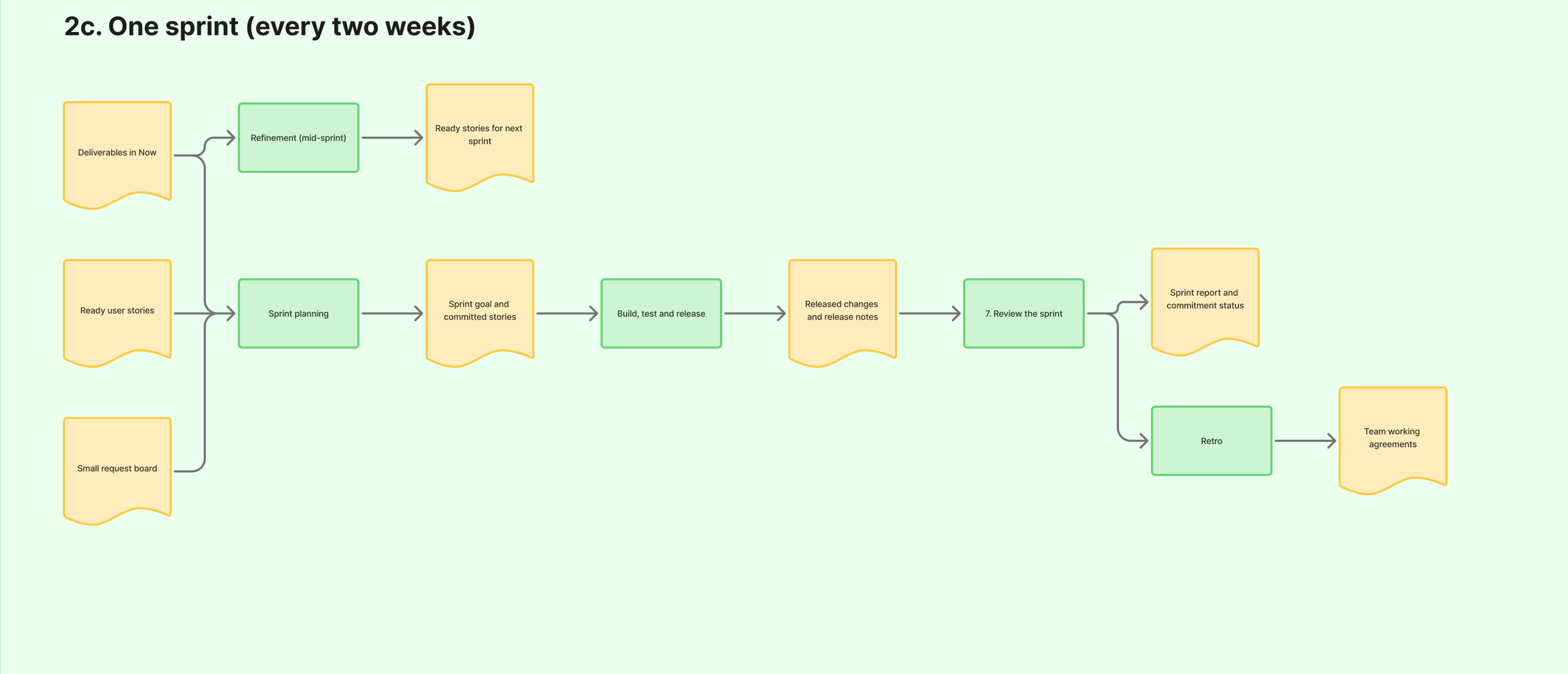
- Started at sprint planning (step 6, Build and release). The scrum master adds the new sprint's report with the sprint goal and the number of stories committed.
- Updated at sprint review (step 7, Review the sprint), on the last day of each two-week sprint. That review is where status on each quarterly commitment changes.
- Closed out at the quarter review. Each commitment is marked Done or rolled forward with a note.
- Goal progress is not updated here. The goals table in section two changes once a quarter, at quarterly planning. The sprint report tracks Deliverables. Goals track behavior change, which moves too slowly to read every two weeks.
Who
- Product owner drafts the report the day before sprint review. They fill in the work commitment rows and the Small requests row.
- Scrum master brings the numbers: stories committed and completed, and unplanned work.
- Product manager owns each commitment's status and writes Blockers and Asks and Changes to Commitments. They decide the recovery for anything Off track, hear the advisory group's view, and go to the steering group sponsor when recovery needs resources or a tradeoff.
- Development team, UX designer and researcher, technical architect and content strategist supply percent complete and confidence for their work. The person writing the note asks the team instead of guessing.
- Readers: executive steering group, advisory group, impacted managers, and anyone who asked "where is my thing?"
How it works
- Write the sprint goal at planning. One or two sentences about the outcome of the sprint, not a list of stories. At review, answer yes or no: was the goal met?
- Record committed and completed. Count the stories pulled in at planning and the stories that met the definition of done. Also note any unplanned work: anything that took real time and wasn't in the plan. Unplanned work is often the reason a number slipped, so name it.
- Update each work commitment. One row per Deliverable from the Now column, grouped under its Initiative and Solution. Each row gets a status, a status note and, if it is Off track, how to get back on track.
- Write the status note in your own words. It's a free field: what changed this sprint and what's next. A useful note usually has percent complete, the next action, timing and confidence, and names the environment (development, staging, production). Percent complete and confidence come from the team. One to three sentences.
- Set the status. Use one of four labels:
| Status | Meaning |
|---|---|
| Committed | Planned this quarter, not started |
| On track | Started and expected to finish this quarter |
| Off track | Likely to miss, or will miss. Needs a recovery plan. |
| Done | Delivered as its delivery type says: released, in service or handed off |
- Every Off track row gets a way back. The status note says why it slipped. The How to get back on track field says what happens now: cut scope, move dates, add help, or drop the commitment, and who decides. If the team can't recover without a decision from someone else, it goes in Blockers and Asks.
- Check the standing commitments. Small requests and Technical maintenance each have an ongoing commitment set at quarterly planning. Say whether it was met this sprint, with the number.
- Fill in Sprint Notes, then collapse the report. When the next sprint starts, the finished report shrinks to one line in the sprint history table. The newest full report stays on top.
Delivery type says how a Deliverable lands: Release ships to users, In service puts a system or shared component into production use behind the scenes, Hand off transfers to another team or to staff. Delivery type is a different thing from work type. A Strategic Deliverable can land as a hand off. It's set on the roadmap's intended progress card, so the sprint report doesn't repeat it.
Template
Use Sprint report.
DMV example
The filled DMV Sprint 3 report, with the sprint history, is in Sprint report.
Rules of thumb
- Bad news needs a why. "Off track" alone makes people nervous. "Off track because training waits on the finished service, and here is our plan" makes them useful.
- Be specific. Name the environment, the date and the person or team you're waiting on. "In progress" tells the reader nothing.
- Ask the team for percent and confidence. Don't make up the numbers yourself. Confidence closes the gap between how likely something is and how it sounds.
- When timing is unknown, say what would make it known. "We can estimate once legal answers" is a real status.
- Answer status questions within one working day, using the same note pattern. If you need time to get the real answer, say when you'll have it.
- If a row stops meaning anything, cut it. A row nobody reads makes the rows that matter harder to find.
Files for this chapter
Blank template plus a filled DMV example for each.
Taught in
- How We Run a Sprint · Practice: sprints and the sprint report, 21 slides
On the board