The system12Draft
Build, release and enable
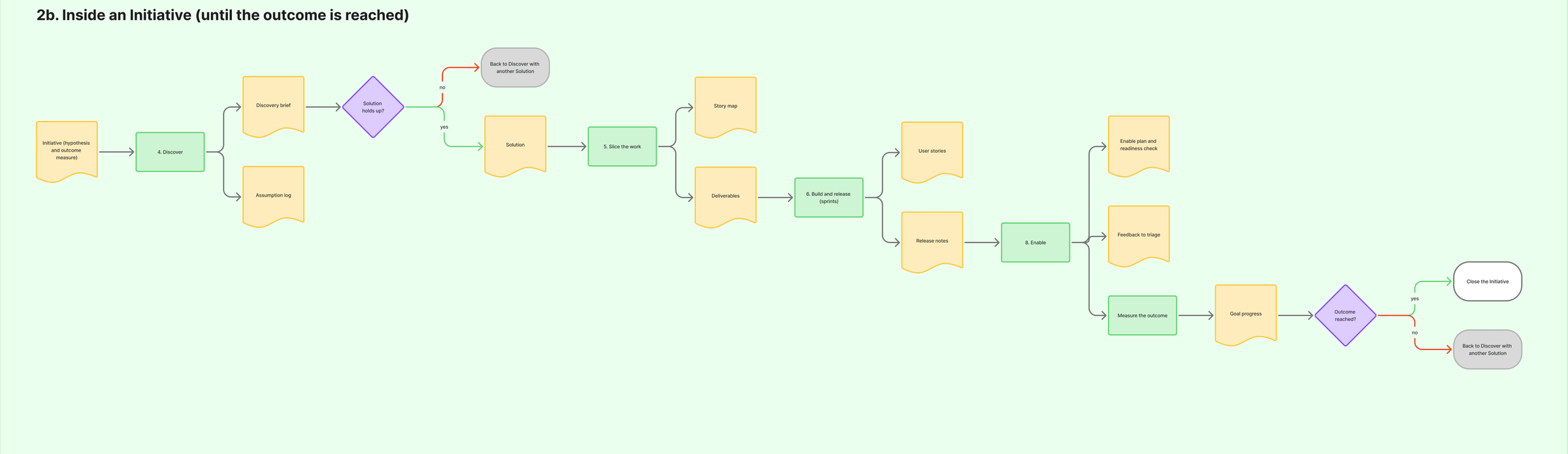
This document covers process steps 6 (Build and release) and 8 (Enable). The team builds Deliverables in sprints and releases them to production. Then it makes sure the people who use and support the service can succeed with it. Shipping is not the finish line. A service only counts as working once people use it well and their feedback flows back into the idea log.
When
- Build and release runs every two-week sprint. The team releases whenever a Deliverable meets the definition of done. It does not wait for the end of the quarter.
- Launch happens when a release changes what people outside the team need to know or do. Launches are less frequent than releases and get planned on purpose.
- Enable starts while the team is still building. Training and guides are ready on launch day. Feedback collection then runs continuously for as long as the service is live.
Who
- Product manager: decides when a Solution launches and who it reaches first. Sends release notes for Solution-sized launches. Owns the call on what feedback changes the roadmap.
- Product owner: sends release notes for story-sized releases and fixes. Runs the readiness check. Routes feedback through weekly triage.
- Development team: builds, tests and releases. Fixes defects that come back from users.
- Scrum master: keeps the sprint loop healthy. See the Team rhythm document.
- Content strategist: leads Enable. Writes guides, runs training, recruits and supports champions, and collects feedback from partner staff.
- UX designer and researcher: watches how people use the release and feeds findings into discovery.
- Technical architect: confirms the release is safe to run and can be rolled back.
- Advisory group and partner managers: confirm their staff are ready, and release staff time for training and champion work.
How it works
1. Build in sprints
The team pulls ready user stories into a two-week sprint, builds them, and demos them at sprint review. The Team rhythm document covers sprint planning, daily stand-up, review and retrospective, so they are not repeated here. One rule from that loop matters for this document: at the end of every sprint the work should be deployable. If it can't go to production, it isn't done.
2. Know the difference between a release and a launch
A release puts a working digital solution into production. It can be a bug fix or a backend change. It can also be a change that is switched off, or one that only a beta group can see. A release does not need anyone outside the team to get ready.
A launch is when you expect people to start using something new. Someone outside the team now has to be ready: front-line staff, the help desk, content editors, or the partner program that owns the service.
Keeping the two apart lets the team release small and often while launches stay deliberate. Most releases are not launches. Every launch is built on releases that already happened.
3. Run a readiness check before every launch
The product owner sends a short go/no-go check to each group the launch affects. It names what is launching, to whom, and when. Each group gets one question: are you ready? They reply yes, no, or with a concern by a set time. If a group doesn't reply, that counts as a yes, and the group takes responsibility for its own people.
A "no" pauses the launch. It does not pause the release. The code can sit in production, switched off, until the group is ready.
4. Write release notes for the person whose day changes
Release notes are an artifact in the chain: they close the loop on a Deliverable. Write two versions, because the readers need different things.
- Internal notes go to staff and partners before the change goes live: at least a day ahead for a launch, a few hours ahead for a small release. They answer what changes, when, why, how people get it, and what support staff need to know.
- External notes go to residents and other users when the change goes live. Open with the benefit in plain words. Then say what they need to do, if anything.
Use benefit language. "You can now renew your registration online in about five minutes" beats "Renewal module v1 deployed." Fixes get a short form: what, when, what you need to know. Don't send notes for internal test environments. Do send them for beta and general releases.
5. Enable: alternate between teaching and listening
Enable runs in two alternating modes:
- Teach, train, help. Write guides and quick-reference sheets. Run hands-on training sessions. Publish help content. Be available in the first weeks.
- Listen, capture, advocate. Ask how it's going. Watch usage data. Collect stories from the front line. Bring the themes back to the product team.
Champions make this scale. A champion is a partner staff member who learns the service early, helps peers, and reports what they hear. Champions are not the help desk, and they don't set the roadmap. They advocate, and the product manager decides. Their input carries real weight, but it is one input among several.
The Enable stage has two kinds of output. The first is the guides and training materials. The second is a steady flow of captured feedback. The test is whether partners can keep using the service after the digital services team moves on, and whether users can succeed with it as well as reach it.
6. Send feedback back into the system
Every piece of feedback gets a destination (see Request triage and the idea log). Defects skip triage; everything else goes through it:
- Defects go to the technical architect as Technical maintenance. Check for a duplicate first. Link each new report to the existing defect, because more reports raise its priority. When the fix ships, tell the people who reported it.
- Small fixes and usability tweaks go to the small request board.
- Bigger needs or improvement ideas go to the idea log, where they can grow into a new Initiative.
- Already planned items get a reply that says so.
Results also feed goal progress. That data gets reviewed at quarterly planning.
Template
Use Launch readiness check, Release notes and Enable plan.
DMV example
Context. The roadmap commits this quarter to the Deliverables of Vehicle Renewal Service, a Solution of the Online vehicle renewal Initiative, which serve Goal 1: 75% of vehicle registration renewals completed online within 5 minutes. Last sprint the database integration went to production with no visible change. That was a release, not a launch.
Launch readiness check and release notes. Online renewal launches to a beta group of 25 residents, the Q1 intended progress for Goal 1. The contact center says no, because its scripts don't cover beta users yet, so the launch moves a week while the scripts get written. The release itself is already in production, which is why moving the launch costs nothing. The filled check is in Launch readiness check and both release notes are in Release notes.
Enable. The Staff Training Program had been marked Off track because training was waiting for the service to be finished. The team moved it into Enable and started in parallel with the build. One front-counter champion per pilot office tried the beta a week early. The content strategist wrote a one-page guide on "helping a customer who started online" and ran two 30-minute counter sessions.
Feedback routing. In week 1, champions report that beta users with a new mailing address can't find where to change it before renewing. Triage sends "link to address change from the renewal start page" to the small request board. Champions also report that customers with lapsed registrations can't use the online path. That goes to the idea log as a possible Initiative. Median completion time in the beta is 6 minutes, and that number goes into goal progress for quarterly planning.
Rules of thumb
- Release often and launch on purpose. Turning something on for users is a business decision. Deploying code is not.
- No reply counts as a yes. A group that stays silent owns its own readiness.
- Write the release note for the person whose day changes, not for the team that built it.
- Start Enable when you start building. Training that waits for "done" is training that arrives late.
- Champions advocate and the product manager decides. Treat their input as important, but as an input.
- Every piece of feedback lands somewhere. If it goes into a drawer, people stop giving it.
Files for this chapter
Blank template plus a filled DMV example for each.
Taught in
- How We Run a Sprint · Practice: sprints and the sprint report, 21 slides
On the board